Function Declaration vs Function Expression: What’s the Difference?

Imagine you walk into your favorite local café. You don’t have to explain the physics of steam or the exact grind size of a bean every single time you want a drink. Instead, you just say, "One medium latte, please."
Behind the counter, the barista follows a specific "script" or set of instructions:
Steam the milk.
Pull the espresso shots.
Combine them in a medium cup.
Hand it to the customer.
In JavaScript, a Function is exactly like that coffee order. It’s a reusable block of code designed to perform a specific task. You define the instructions once, and then you can "call" them whenever you need them, without rewriting the logic every time.
What Exactly Is a Function?
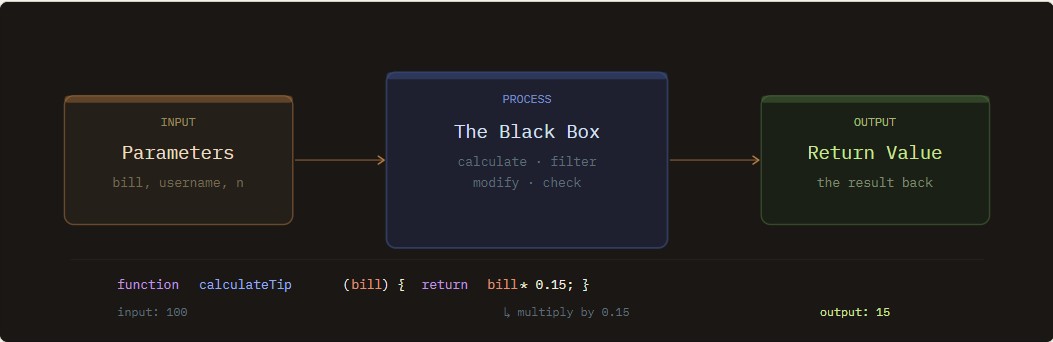
Think of a function as a saved piece of logic that you can use whenever you need it.
In technical terms, a function is a self-contained block of code designed to perform a specific task. It sits quietly in your program until you call it by name, and then it runs its instructions and (sometimes) gives you a result back.
You can imagine it like a mini machine inside your code: you give it something to work with, it processes it, and then it returns an answer.
The Three-Step Life of a Function
Most functions follow a simple pattern:
1. Input (Parameters)
These are the values you give the function so it can do its job.
Example: a bill amount, a username, or a number.
2. The Process
This is where the actual work happens.
Inside the function, JavaScript might:
perform calculations
filter data
modify text
check conditions
You can think of this part as the black box where the logic lives.
3. Output (Return Value)
After finishing its work, the function can return a result back to the main program.
Example:
function calculateTip(bill) {
  return bill * 0.15;
}
Here:
Input:
billProcess: multiply by
0.15Output: the calculated tip
The two most common ways to write a function.
Function declaration
Function expression
What are Functions and Why do we Need Them?
Think of a function as a save point for your logic. In technical terms, it is a self-contained block of code. It sits there quietly until you "call" it by name.
Why bother with them?
The DRY Principle (Don’t Repeat Yourself): If you need to calculate a 15% tip, you don’t want to write that math formula 20 times. Write it once, use it everywhere.
Organization: It turns a "wall of code" into a Table of Contents. Instead of raw math, your script reads like a story:
validateUser(),processPayment(),sendEmail().The "Fix Once" Rule: If the tax rate changes, you update the
calculateTaxfunction once, and your entire app is fixed instantly.
Function Declaration Syntax
To build our "Coffee Machine" in code, we use the Function Declaration. This is the most traditional way to define a function in JavaScript.
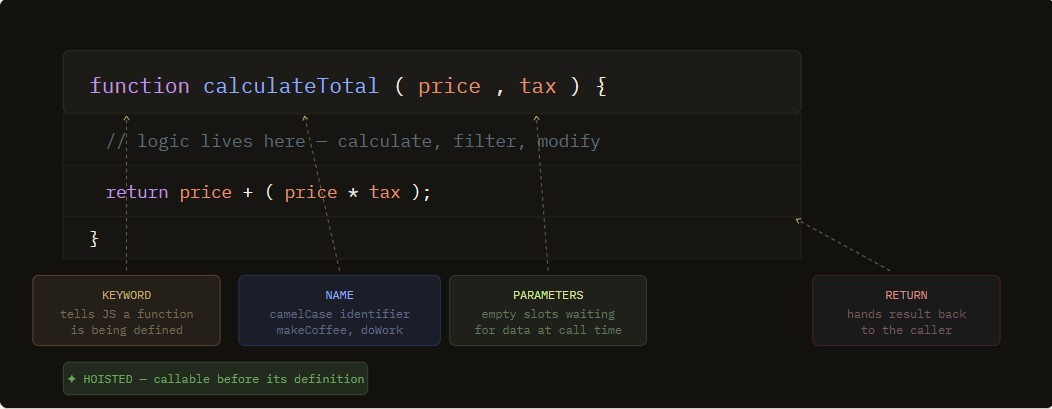
The Anatomy
A standard declaration looks like this:
function nameOfFunction(parameter1, parameter2) {
  // The code to be executed (The Logic)
  return parameter1 + parameter2;
}
functionKeyword: Tells JS you're creating a function.The Name: Usually camelCase (e.g.,
makeCoffee).Parameters: The empty slots inside
()that wait for data.The Body: The code inside
{}that does the heavy lifting.Return: The "hand-off" that sends the result back to you.
A Practical Example
function calculateTotal(price, taxRate) {
  let total = price + (price * taxRate);
  return total;
}

// Calling the function
let myBill = calculateTotal(10, 0.07);
console.log(myBill); // Output: 10.7
Pro-Tip: Hoisting
One unique superpower of Function Declarations is Hoisting. This means JavaScript "lifts" these functions to the top of your code before running it. You can actually call a function before you've even written the code for it!
sayHi(); // This works!

function sayHi() {
  console.log("Hello!");
}
Function Expression in JavaScript
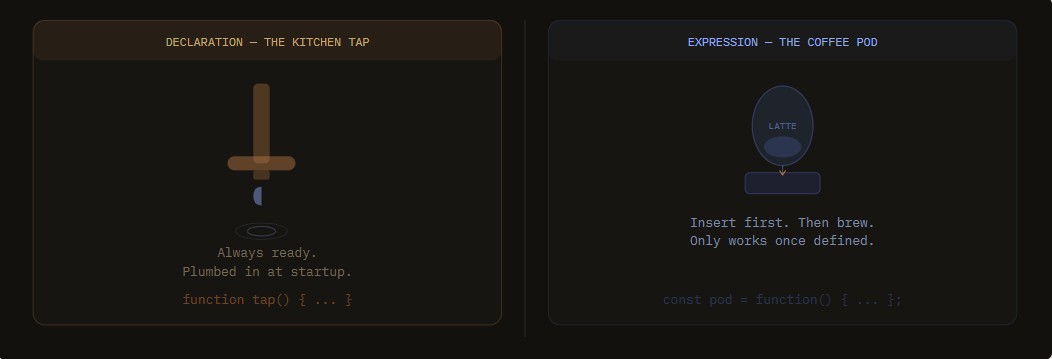
If the Function Declaration is like a traditional recipe in a cookbook, a Function Expression is like a secret sauce you store in a specific container.
In JavaScript, a function expression is when you create a function and assign it to a variable. This treats the function like any other piece of data (like a string or a number).
The Anatomy of a Function Expression
Variable Declaration: You start by declaring a variable using
constorlet.The Assignment (
=): You assign the function to that variable.Anonymous Function: Notice that the word
functionis often followed directly by(). The function doesn't need its own name because the variable name is how you will call it.The Semicolon: Because this is technically an assignment statement (like
const x = 5;), it’s good practice to end it with a semicolon;.
The Basic Syntax
const nameOfVariable = function(parameter1, parameter2) {
  // The code to be executed
  return parameter1 * parameter2;
};

// Calling the function
console.log(nameOfVariable(5, 10)); // Output: 50
A Practical Example: The "Digital Receipt"
Let’s say you want a function that formats a price into a string.
const formatPrice = function(amount) {
  return "$" + amount.toFixed(2);
};

const shirtPrice = formatPrice(19.99);
console.log(shirtPrice); // Output: "$19.99"
Key Difference: No Hoisting! 🚫
Unlike Function Declarations, Function Expressions are not hoisted. This means you cannot call the function before you define it. If you try, JavaScript will throw an error because the variable hasn't been initialized yet.
This won't work:
sayHello(); // ReferenceError!

const sayHello = function() {
  console.log("Hi!");
};
Why use Expressions over Declarations?
Cleaner Scope: Since they aren't hoisted, they force you to define your tools before you use them, leading to more predictable code.
Closures and Callbacks: They are essential when you want to pass a function as an argument into another function (like telling a button to run a specific script only when clicked).
Arrow Functions: Most modern "Arrow Functions" are actually a shorthand version of Function Expressions!
What is Hoisting (The "Scanner" Analogy)
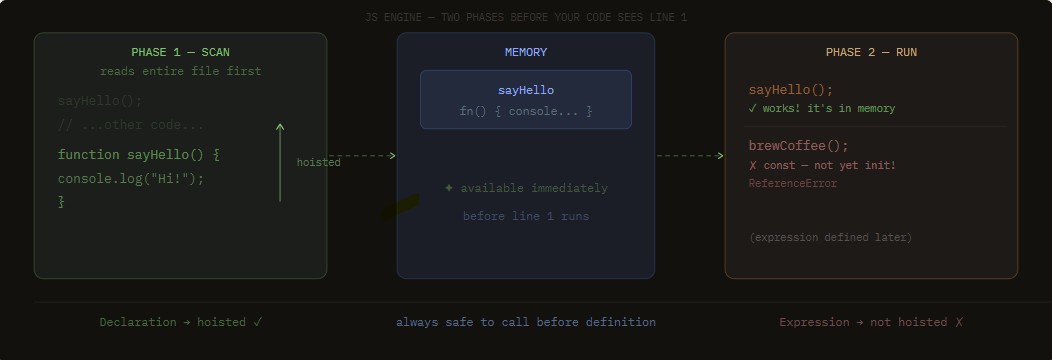
Imagine you hand a long list of instructions to a robot. Before the robot starts doing step #1, it quickly scans the entire page to see what tools it has available.
In JavaScript, Hoisting is that scanning process. The JS engine takes all your function declarations and "lifts" them to the top of the script's memory before it actually runs a single line of code.
The "Magic" of Hoisting
Because of this "scanning phase," you can actually use a function before you have written it in your code.
Example of Hoisting in Action:
// 1. We call the function first
sayHello();

// 2. We define the function later
function sayHello() {
  console.log("I was hoisted!");
}
Even though sayHello() is called at the top, JavaScript already knows it exists because it scanned the file and "lifted" the definition to the top in its own memory.
The Catch: Not Everything is Hoisted
This is the most important part for your blog readers: Only Function Declarations get this special treatment.
Function Declarations: ✅ Hoisted. You can call them anywhere.
Function Expressions: ❌ Not Hoisted. If you try to call a variable-based function before defining it, your code will crash.
Summary Table: Declaration vs. Expression
Feature | Function Declaration | Function Expression |
Syntax |
|
|
Hoisted? | Yes (Can call before defining) | No (Must define before calling) |
Naming | Must have a name | Can be anonymous |
Use Case | General purpose utility | Callbacks, modular code, arrows |
When to Use Each Type of Function
1. Function Declaration: The "Kitchen Tap"
Think of a Function Declaration like the water tap in the office kitchen.
The Setup: When the building was plumbed, the tap was connected to the main pipes. It is a permanent part of the kitchen structure.
The Usage: Anyone can walk in at any time and get water. You don't have to "install" the tap every morning; it’s just there and ready.
The "Hoisting" Connection: Just like the pipes are already behind the wall when you walk in, JavaScript "installs" this function in memory before the first line of code runs. You can call it whenever you want.
This function is "plumbed" into the system. You can call it whenever you want, even before the code defines it.
// 1. Getting water (calling the function)
getWater();

// 2. The "Tap" is defined down here
function getWater() {
  console.log("Water is flowing... (Reliable and always available)");
}

// Result: "Water is flowing..."
Why use it? It’s great for basic tools you need across your entire project. It's safe and easy for beginners.
2. Function Expression: The "Coffee Pod" (Nespresso)
Think of a Function Expression like a specific coffee pod you keep in your desk drawer.
The Setup: The coffee doesn't "exist" in the machine until you take the pod out and put it in. You are assigning that specific flavor (the logic) to the machine (the variable) for that moment.
The Usage: If you try to press the "Brew" button before you’ve actually put the pod in, you just get hot water (or an error). The "logic" only works once you’ve physically placed it there.
The "No Hoisting" Connection: In code, you must define the variable first. If you try to run the function before that line, JavaScript says, "There's no pod in the machine yet!"
// 1. Trying to brew before inserting the pod will CRASH
// brewCoffee(); <-- This would cause an Error!

// 2. "Inserting the pod" (defining the function)
const brewCoffee = function() {
  console.log("Brewing your specific Nespresso pod... (Modern and controlled)");
};

// 3. Now it works!
brewCoffee();

// Result: "Brewing your specific Nespresso pod..."
Why use it? It keeps your code tidy. Because it isn't "plumbed in" everywhere, it only exists exactly where you define it. This is the foundation for modern Arrow Functions.
Summary
Feature | Declaration (The Tap) | Expression (The Pod) |
Availability | Always there from the start. | Only there once you "insert" it. |
Flexibility | Fixed; stays in one place. | Portable; you can swap flavors/logic easily. |
When to use? | For "Everyday" tools everyone needs. | For "Specific" tasks that only happen sometimes. |
Conclusion
In the world of JavaScript, Function Declarations and Function Expressions are both essential tools, but they "wake up" at different times.
Function Declarations are like Kitchen Taps: They are "plumbed in" (hoisted) before the code even runs. Use them for your main, reliable tools that you want to be available anywhere in your script.
Function Expressions are like Coffee Pods: They only exist once you "insert" them into a variable. Use them when you want more control, such as for button clicks (callbacks) or sleek, modern arrow functions.
The Golden Rule: Choose declarations for clarity and expressions for flexibility.
Comments
Join the discussionNo comments yet. Be the first to comment.